Securing Administrative Access to Azure Virtual Desktop with Dedicated Workstations
Entra ID Privileged Access Workstation (PAW)
AZURE
Nyan
7/30/20251 min read
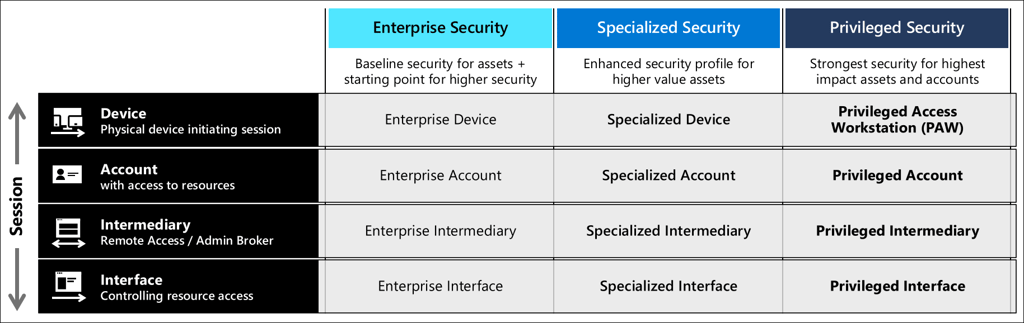
If you're managing Azure Virtual Desktop (AVD) and still letting admins do high-privilege tasks from their everyday laptops, it's time for a rethink.
What's the gold standard? Privileged Access Workstations (PAWs).
These aren't just regular machines—they're locked-down, purpose-built devices used solely for sensitive admin work. No web surfing, no personal apps, no unnecessary software. Just a clean, secure environment that dramatically reduces the attack surface.
By combining PAWs with Conditional Access policies, you can ensure only trusted machines are allowed to perform admin operations. Add a custom device tag-like extensionAttribute1 - to identify approved workstations, and you’ve got a reliable way to enforce control.
Yes, MFA and tools like Azure Bastion have their place, but they don't guarantee the endpoint is safe. But, PAWs do. They’re what serious organisations use when they care about security, auditability, and keeping their hight-value assets locked down.
Bottom line: If your admins aren’t using PAWs, they’re working in an unnecessary risky zone.