100 Days of Cloud (Azure Edition)
Day 3 of Cloud (Azure Edition)
AZURE
Nyan
11/26/2025
Day 3: Create an Azure Virtual Machine with VLI
Task: The Nautilus DevOps team is in the process of migrating some of their workloads to Azure. One of the tasks involves creating a new Virtual Machine (VM) using the Azure CLI. The team does not have access to the Azure portal but can manage Azure resources via the azure-client host (the landing host for this lab).
Create a new Azure Virtual Machine named datacenter-vm using the Azure CLI.
Use the Ubuntu2204 image and set the VM size to Standard_B2s.
Make sure the admin username is set to azureuser and SSH keys are generated for secure access.
Use Standard_LRS storage account, disk size must be 30GB and ensure the VM datacenter-vm is in the running state after creation.
Day 3 of 100 Days of Cloud (Azure Edition) : Solution
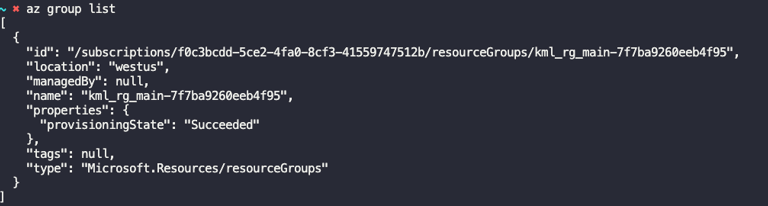
Try to locate the existing azure resource group with provided terminal.
az group list
Day 3 of 100 Days of Cloud (Azure Edition) : Cheers


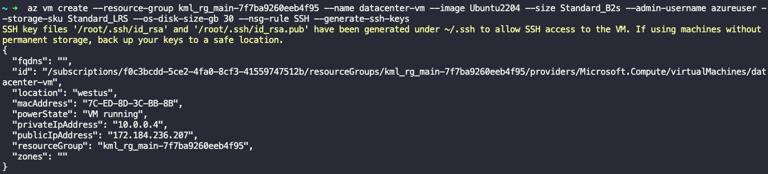
Try to create the new azure virtual machine via provided command.
az vm create --resource-group kml_rg_main-7f7ba9260eeb4f95 --name datacenter-vm --image Ubuntu2204 --size Standard_B2s --admin-username azureuser --storage-sku Standard_LRS --os-disk-size-gb 30 --nsg-rule SSH --generate-ssh-keys