





100 Days of Cloud (Azure Edition)
Day 29 of Cloud (Azure Edition)
AZURE
Nyan
12/22/2025
Day 29: Working with Azure Container Registry (ACR)
Task: The Nautilus DevOps team has been tasked with setting up a containerized application. They need to create a Azure Container Registry (ACR) to store their Docker images. Once the repository is created, they will build a Docker image from a Dockerfile located on the azure-client host and push this image to the ACR repository. This process is essential for maintaining and deploying containerized applications in a streamlined manner.
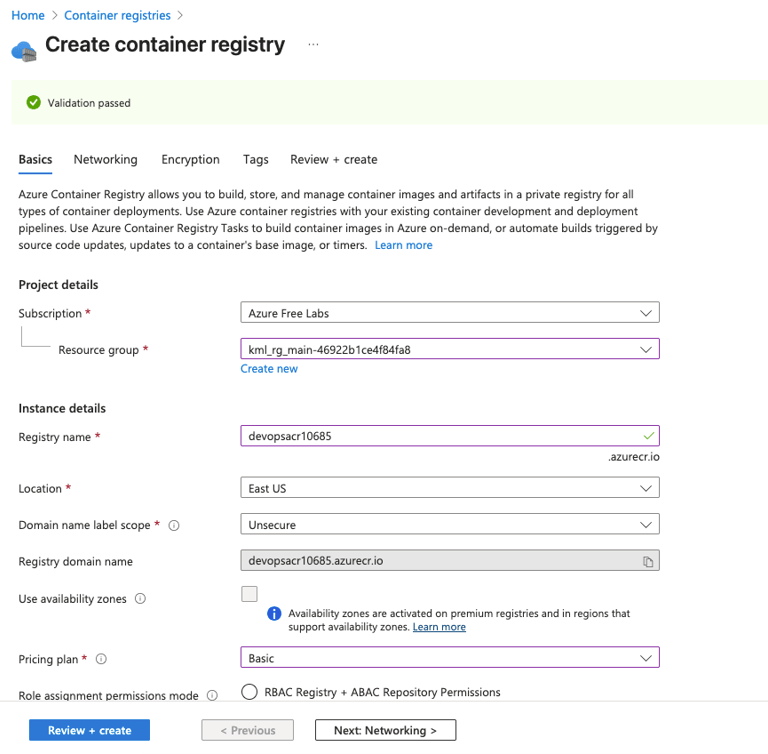
Create a ACR repository named devopsacr10685 under East US.
Pricing plan must be Basic.
Dockerfile already exists under /root/pyapp directory on azure-client host.
Build a Docker image using this Dockerfile and push the same to the newly created ACR repo. The image tag must be latest i.e devopsacr10685:latest.
Use the below given Azure Credentials: (You can run the showcreds command on azure-client host to retrieve these credentials)
Day 29 of 100 Days of Cloud (Azure Edition) : Solution
Type container registry in the azure portal and click ACR to create container registry.
Day 29 of 100 Days of Cloud (Azure Edition) : Cheers


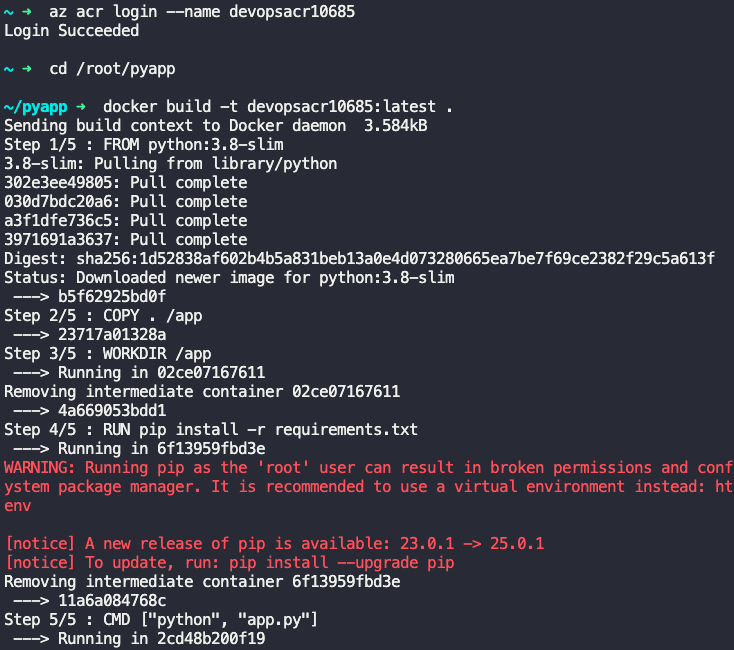
Access to the Azure ACR via the command as follows:
az acr login --name devopsacr10685
Build the Docker Image: Navigate to the directory containing your Dockerfile and build the image.
docker build -t devopsacr10685:latest .
Tag and Push to ACR
az acr show --name devopsacr10685 --query loginServer --output tsv
docker tag devopsacr10685:latest devopsacr10685.azurecr.io/devopsacr10685:latest
docker push devopsacr10685.azurecr.io/devopsacr10685:latest