100 Days of Cloud (Azure Edition)
Day 18 of Cloud (Azure Edition)
AZURE
Nyan
12/10/2025
Day 18: Copy Data to an Azure Blob Storage Container
Task: The Nautilus DevOps team is presently immersed in data migrations, transferring data from on-premise storage systems to Azure Blob containers. They have recently received some data that they intend to copy to one of the Blob containers.
A Blob container named datacenter-blob-17986 already exists in the East US region under the storage account datacenterst1021. Copy the file /tmp/datacenter.txt to the Blob container datacenter-blob-17986.
Use below given Azure Credentials: (You can run the showcreds command on the azure-client host to retrieve credentials)
Day 18 of 100 Days of Cloud (Azure Edition) : Solution
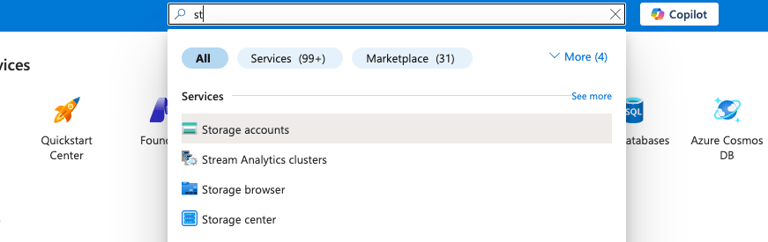
Type st in the search box and choose Storage accounts.
Day 18 of 100 Days of Cloud (Azure Edition) : Cheers


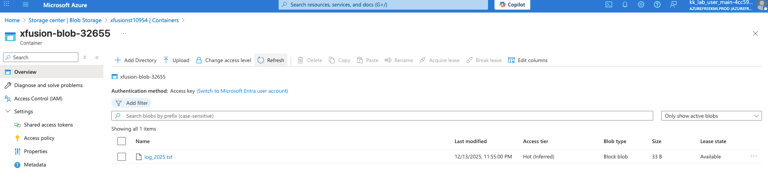
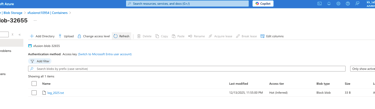
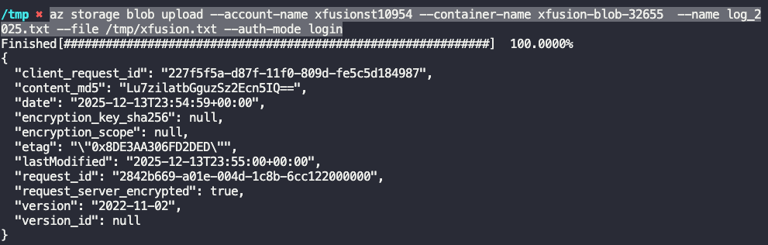
Copy the data from the jumphost to the azure blob storage container by using this command.
az storage blob upload \ --account-name datacenterst1021 \ --container-name datacenter-blob-17986 \ --name datacenter.txt \ --file /tmp/datacenter.txt \ --auth-mode login