





100 Days of Cloud (Azure Edition)
Day 12 of Cloud (Azure Edition)
AZURE
Nyan
12/5/2025
Day 12: Add and Manage Tags for Azure Virtual Machines
Task: The Nautilus DevOps team is migrating a portion of their infrastructure to Azure. During the migration, they have created several virtual machines (VMs) in different regions. The team has identified one VM that is not tagged properly so they decided to tag it as needed.
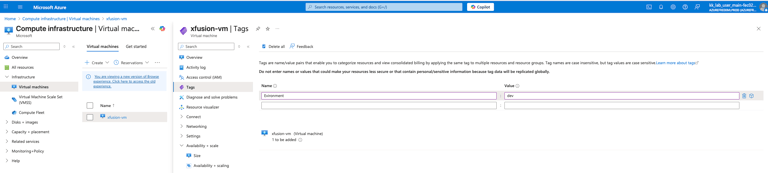
Add the tag Environment=dev to the virtual machine named xfusion-vm.
Use below given Azure Credentials: (You can run the `showcreds` command on the `azure-client` host to retrieve these credentials)
Day 12 of 100 Days of Cloud (Azure Edition) : Solution
Type vm in the search portal and choose Virtual machines.
Choose the existing vm xfusion-vm.
Click the Tags setting and type Name = Environment , Value = dev and click apply button.
Day 12 of 100 Days of Cloud (Azure Edition) : Cheers

