100 Days of Cloud (Azure Edition)
Day 11 of Cloud (Azure Edition)
AZURE
Nyan
12/4/2025
Day 11: Change Azure Virtual Machine Size Using Console
Task: The Nautilus DevOps team is migrating a portion of their infrastructure to Azure. During the migration, they have created several virtual machines (VMs) in different regions. The team has identified one VM that is underutilised and has decided to change its size to optimise resource usage.
1) Change the VM size from Standard_B1s to Standard_B2s for the virtual machine named datacenter-vm.
2) Ensure the VM is in the running state after the size change is complete.
Use below given Azure Credentials: (You can run the `showcreds` command on the `azure-client` host to retrieve these credentials)
Day 11 of 100 Days of Cloud (Azure Edition) : Solution
Type vm in the search portal and choose Virtual machines.
Choose the existing vm datacenter-vm.
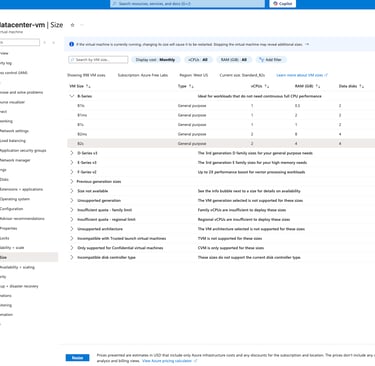
Click the Availability + scale setting and choose the size to scaling the size of VM.
Select the VM size from B1s to B2s to upsizing the VM and click Resize.

Day 11 of 100 Days of Cloud (Azure Edition) : Cheers